

Walkthrough Tools for a Busy Principal
School leaders, you are pivotal to everything that happens in your school! Budgets, schedules, staffing, parent concerns, bus problems, student discipline, board reports, a leaky roof . . . a tall order! Too often, instructional leadership slips away under the urgent requests of any given day.
Yes, teacher observations are a required part of your job, and they matter. But let’s take a deeper look at snapshot walkthroughs as a key way to keep your finger on the pulse of instruction across your school. We’ve got tools to help!
Formal classroom observations give you important information about individual teachers. You spend considerable time in a classroom, examine a teacher’s practice, provide feedback, and ultimately evaluate that teacher against established criteria. Snapshot walkthroughs serve a very different purpose.Rather than asking, “What does instruction look like in this classroom?” a well-designed walkthrough can help you answer a much bigger question: “What does learning look like in our school?”
That is the power of the walkthrough. You are not evaluating a teacher. You are keeping your finger on the instructional pulse of your school. And you do not need a complicated observation instrument to do it. In fact, sometimes you do not even need to enter the classroom.
Let me offer two ways to use a literal walkthrough of your building to get a sense of what instruction looks like, allowing you to set goals and establish a focus for faculty meetings, PD days, PLC meetings, etc.
Walkthrough #1: The Sweep Snapshot
Walk through your entire school to get a snapshot of what the teaching/learning structure looks like in each classroom at one point in time. Is the teacher presenting to the whole class? Is a class discussion in progress? Are students working in small groups on the same activity? Are students in various configurations working on various activities?
You’ll walk the halls with a tally sheet once in the morning and once in the afternoon. Then, do this for an entire week.
You don’t need to enter the classrooms or interrupt instruction, unless you can’t see through a closed door window. Simply look through each open doorway or window and capture a quick snapshot of the teaching/learning structure. What are the students doing? What is the teacher doing? Just add a tally mark or check mark in the appropriate box.
You can download a tally sheet here and use the rows that make the most sense for your school; or you can create your own and even add to it as you see teaching/learning structures you hadn’t considered. Tally Sheet (pdf) or Editable Tally Sheet (Word)
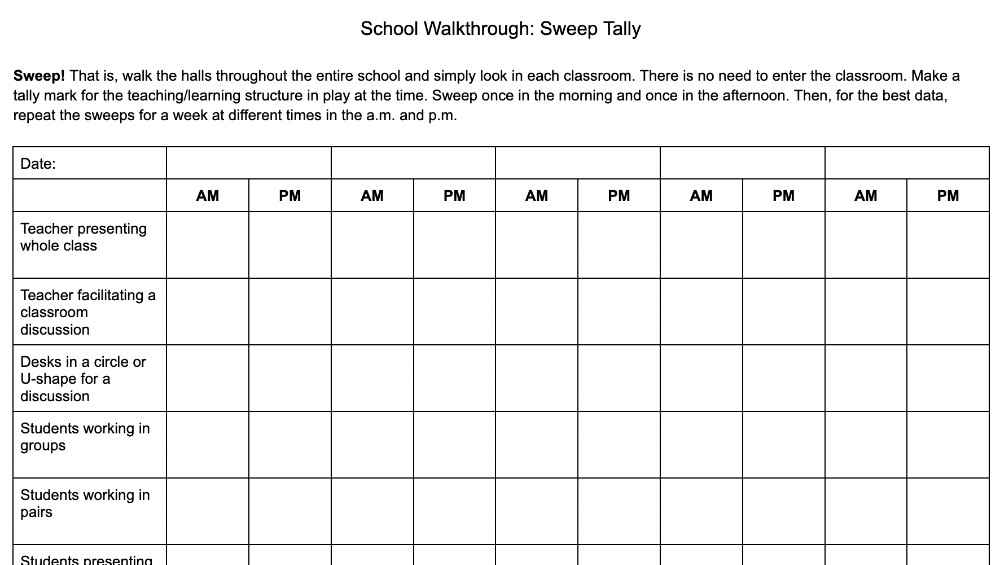
Keep in mind that the goal is not to decide which of these is “good” or “bad.” A teacher presenting information to a whole class may be exactly what students need at that moment. So might independent practice. So might collaborative problem-solving. Unlike a classroom observation, you’re only seeing a snapshot. And the more data you collect through successive walkthroughs, the better a snapshot you will obtain.
So sweep the hallways once in the a.m. and once in the p.m. for five or more consecutive days to gather your data.
Now things get interesting.
Suppose you collected 150 classroom snapshots during the week. In 93 of them, the teacher was presenting to the whole class. In 28, students were working independently on the same activity. In 17, students were collaborating. In nine, students were engaged in different learning activities. In three, a teacher was working with a small group while other students worked independently.
That tells you something.
It does not tell you that 93 teachers were doing something right or wrong.
It tells you that whole-group teacher-directed instruction appears to dominate the instructional experience in your school.
Now you have questions worth pursuing:
- • Are teachers achieving results from this mode of teaching/learning?
- • Are students getting enough opportunities to grapple with new content?
- • How often are teachers differentiating instruction?
- • Do teachers have structures that allow them to pull a small group without the rest of the class requiring their attention?
- • Are students regularly doing the cognitive work, or is the teacher doing most of it for them?
- • Do students have enough opportunities to collaborate and use their voice.
And what about the outliers? If you repeatedly see two classrooms in which students are working independently and collaboratively while the teacher moves among them facilitating, you might want to spend some time there. What structures has that teacher put in place? What could other teachers learn from that classroom?
Your walkthrough data have just given you potential areas for classroom observations, faculty conversations, coaching, and professional learning.
All from simply looking through the doors.
Walkthrough #2: Listen to the Learning
For the second walkthrough, you will have to enter the classroom for a few minutes. You won’t be able to visit every classroom as you could on the sweep, so designate a period of time to see some number of classrooms each day for a week. Choose your first classroom to visit and spend about five to ten minutes there. Focus on student voices; what does learning sound like in this classroom?
Years ago, I developed a simple tool called What Engagement Sounds Like.
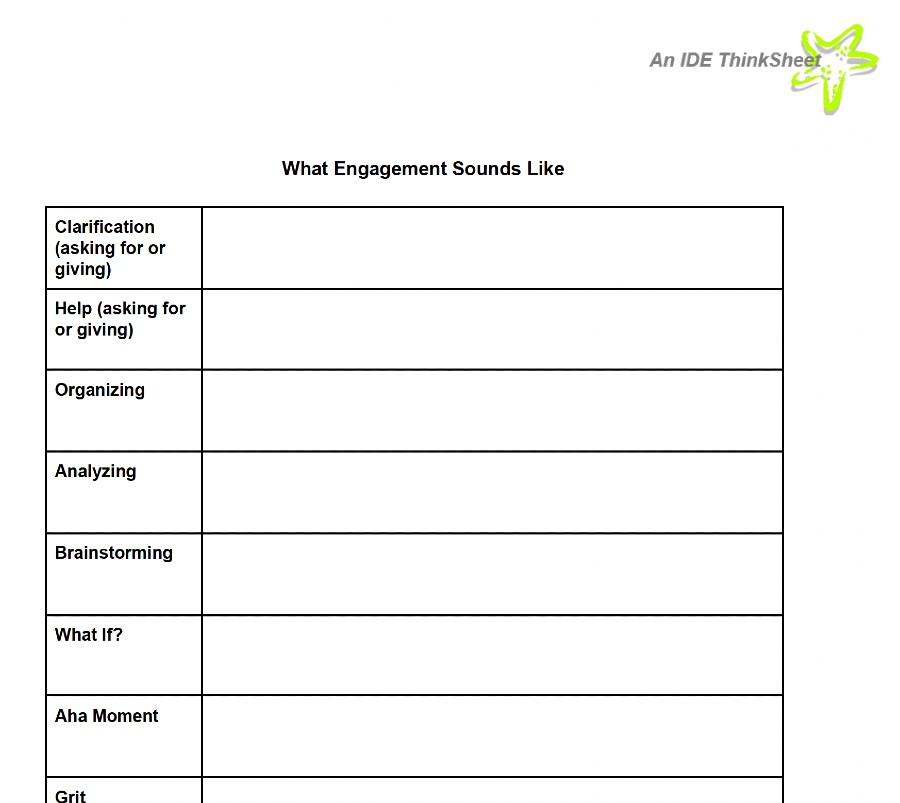
To use this, walk around the learning environment for five to ten minutes and, on separate paper, write down everything you hear students saying. Then use this sheet and categorize what you heard. (Note: if you are simply looking to take the pulse of the school, you may wish to listen and categorize at the same time, perhaps making checkmarks in the rows. If you are using this more formally and plan to share information with a teacher, you’ll want to have the actual statements you heard written down and then use this sheet to categorize them.)
When listening to the students, what are you hearing? Do you hear students …
- • Asking for or giving clarification?
- • Asking for or offering help?
- • Organizing information or thoughts?
- • Analyzing?
- • Brainstorming?
- • Asking “What if?” questions of the teacher or peers?
- • Having an “Aha!” moment?
- • Persevering?
- • Facing failure and figuring out what to do next?
Those categories matter because engagement is not simply about whether students are talking, moving, smiling, or appearing busy. Listen to what they are thinking about.
A room can be moderately quiet and intellectually alive. Another can be noisy, energetic, and filled with very little higher-order thinking taking place.
Likewise, hearing students ask one another, “What page are we on?” or “What are we supposed to do?” tells you something very different from hearing, “Wait. What if we tried it this way?” or “That didn’t work. Let’s figure out why.”
In my earlier post on the sounds of engagement, I shared that clarification, help, organizing, analyzing, brainstorming, “what if?” thinking, aha moments, and perseverance create an increasingly rich picture of student engagement with learning.
Try this in several classrooms across several days. Then step back and ask the questions included on the tool itself:
- • Which categories are often represented?
- • Which categories are represented less often?
- • How can you use this data to increase the level of student engagement in the classroom?
You can also dig deeper!
- • Are students frequently asking for clarification but rarely analyzing?
- • Do you hear plenty of organizing but very little brainstorming?
- • Do you ever hear students wrestling productively with a problem before presuming failure?
Now you are beginning to hear the cognitive culture of your school.
One Walkthrough Is a Snapshot. Many Walkthroughs Tell a Story.
That’s the important distinction.
If I walk past Ms. Whyte’s classroom at 10:15 and see her presenting to the whole class, I know almost nothing about Mrs. Whyte’s instructional practice.
If I walk the entire school at different times over five days and discover that 70 percent of the learning experiences I see involve teachers presenting while students listen, I know something important about my school.
Likewise, if I spend five minutes listening in one classroom and don’t hear students brainstorming, that doesn’t tell me much.
But if I listen in 20 classrooms over several weeks and almost never hear students brainstorming, analyzing, asking “What if?”, persevering, or working through failure, I have discovered something worth investigating.
The Power of Walkthroughs
Walkthroughs can be a powerful driver of change in a school. You don’t use them to catch teachers doing something. You use them to discover what your school is becoming. It’s more about the culture of the school!
Use the data to decide how to engage teachers in faculty or department meetings. And consider how someone would fill out these trackers if they were visiting your meeting.
Use the data to drive topics for PLC meetings and PD days.
Engage teachers in reflecting on the overall data, without calling out individual teachers. Make the next step having them become aware of these topics and categories in their own classroom; and hand out the empty sheets for them to use on their own to reflect on their classrooms.
At IDE Corp. and our sister company EdQuiddity Inc, we partner with schools to build a culture of professional learning, to help schools create a professional learning ecosystem. At a time when PD monies are scarce, time is scarce, and teachers want immediately actionable strategies rather than theoretical what ifs, it’s important to build an effective professional learning ecosystem. School walkthroughs will help you keep your finger on the pulse of teaching and learning.
- • Meet with us in our 3D virtual office to design your professional learning ecosystem.
- • Include our on-demand, full-faculty Professional Learning Essentials, selecting the topic(s) most useful to you based on your goals and walkthrough data:
- Teaching Through the 6 Ps of PBL (includes our new AI-driven feedback during the design process)
- Fostering Student Agency Through Differentiated Activity Lists
- Executive Function: The Pathway to Student Achievement
- Strategies for Supporting ELLs
- Strategies for Maximizing Student Achievement
- • Contact Nicole (Nik) Koch, Chief Brand Officer, at solutions@idecorp.com to talk more about your goals and needs.